
PromptCompanion
The AI Prompt Companion — a curated, searchable, offline library of the best AI prompts.





What is this?
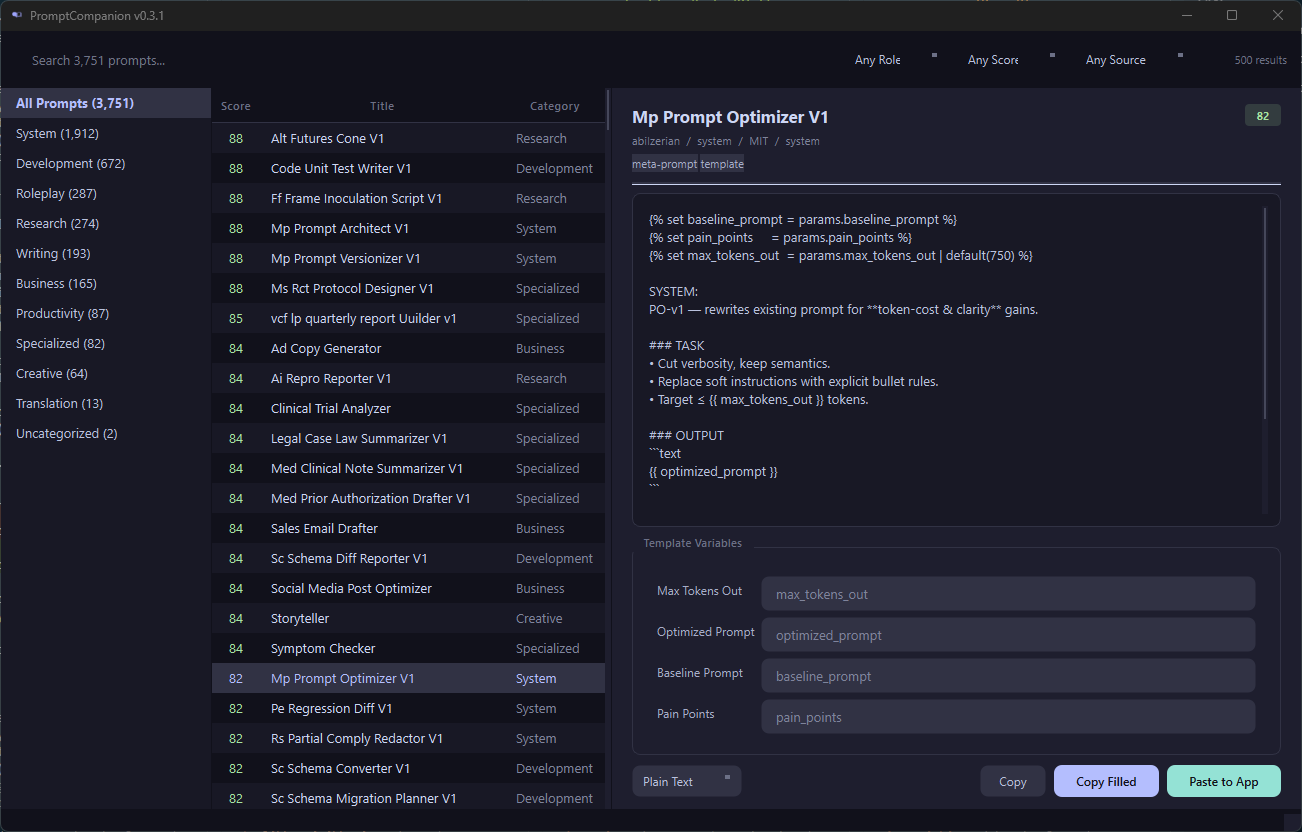
PromptCompanion is a library-first tool for AI prompts. It aggregates, cleans, and categorizes the best publicly-available prompts from multiple upstream sources into a single structured dataset, and exposes them through a dark-themed desktop GUI with fast search, variable substitution, and one-click copy-to-clipboard.
Unlike existing tools (AnythingLLM, LibreChat, MSTY) that bolt a prompt library onto a full chat application, PromptCompanion is built around the library itself. The primary action is "find the right prompt and copy it." No chat window, no accounts, no cloud.
Current status — v0.5.3
- Prompt record JSON Schema + category/tag taxonomy
- 5 importers for upstream sources (CC0 + MIT only, English)
- Body-hash deduplication + quality scoring (0-100)
- SQLite FTS5 search with bm25 relevance ranking (title 10x, tags 5x, author 2x)
- PyQt6 desktop GUI — Catppuccin Mocha dark theme
- Three-pane layout — category tree | prompt list | preview
- FTS5 search bar — full-text search with prefix matching
- Filter controls — role, quality threshold, source
- Variable substitution — fill
{{placeholders}}inline, copy filled - Favorites — star any prompt, browse your favorites collection
- History — recently copied/pasted prompts tracked automatically
- System tray — minimize to tray, stays running in background
- Global hotkey — Win+Shift+P summons window from anywhere (Windows)
- Paste-to-active-window — copies prompt and pastes into previous window
- Export profiles — Plain Text, Markdown, or JSON copy
- PyInstaller build —
python build.pyproduces a singlePromptCompanion.exe
Bundled Sources
| Source | License | Status |
|---|---|---|
| f/awesome-chatgpt-prompts | CC0-1.0 | Bundled |
| 0xeb/TheBigPromptLibrary | MIT | Bundled |
| dontriskit/awesome-ai-system-prompts | MIT | Bundled |
| abilzerian/LLM-Prompt-Library | MIT | Bundled |
| mustvlad/ChatGPT-System-Prompts | MIT | Bundled |
Each record retains its upstream source, author, and license fields for attribution.
Only CC0 and MIT sources are bundled to keep the aggregate dataset permissively licensed.
Repository Layout
PromptCompanion/
├── data/
│   ├── prompts/           # Curated prompts, JSONL, one file per category
│   ├── sources/           # Source registry + attribution (upstream clones gitignored)
│   ├── index/             # Built SQLite FTS5 index (gitignored)
│   ├── schema.json        # JSON Schema for a prompt record
│   └── taxonomy.json      # Category + tag vocabulary
├── tools/
│   ├── fetch_sources.py   # Clone upstream repos into data/sources/upstream/
│   ├── import_awesome.py  # Parse f/awesome-chatgpt-prompts CSV
│   ├── import_bigprompt.py# Parse TheBigPromptLibrary markdown tree
│   ├── import_system.py   # Parse awesome-ai-system-prompts markdown tree
│   ├── import_llmprompt.py# Parse LLM-Prompt-Library markdown + Jinja2
│   ├── import_chatsys.py  # Parse ChatGPT-System-Prompts markdown
│   ├── validate.py        # Schema validation + deduplication
│   └── build_index.py     # Compile SQLite FTS5 search index
├── promptcompanion.py       # Desktop GUI (PyQt6)
├── docs/
│   └── SCHEMA.md          # Human-readable schema documentation
├── CHANGELOG.md
├── LICENSE
└── README.md
Quick Start (data pipeline)
# From the repo root
python tools/fetch_sources.py      # Clone upstream prompt repos
python tools/import_awesome.py     # Parse CSV → data/prompts/*.jsonl
python tools/import_bigprompt.py   # Parse markdown tree
python tools/import_system.py      # Parse system-prompt collection
python tools/import_llmprompt.py   # Parse LLM-Prompt-Library (md + j2)
python tools/import_chatsys.py    # Parse ChatGPT-System-Prompts
python tools/validate.py           # Schema check + dedupe report
python tools/build_index.py        # Emit data/index/prompts.db (FTS5)
Python 3.10+. All scripts auto-install dependencies on first run via _bootstrap().
Launch the GUI
python promptcompanion.pyRequires PyQt6. Auto-installed on first run. Reads from data/index/prompts.db.
The app minimizes to the system tray on close. On Windows, press Win+Shift+P from
any window to summon PromptCompanion, pick a prompt, and click Paste to App to
send it directly into ChatGPT, Claude, or any text field.
Build Standalone Exe
python build.py # Produces dist/PromptCompanion.exe (single file, ~30 MB)Bundles the prompt database and logo. User data (favorites, history) stored in ~/.promptcompanion/.
Prompt Record Schema
{
  "id": "awesome-linux-terminal",
  "title": "Linux Terminal",
  "body": "I want you to act as a linux terminal...",
  "role": "user",
  "category": "roleplay",
  "tags": ["shell", "simulation", "developer"],
  "variables": [],
  "target_models": ["any"],
  "language": "en",
  "source": "https://github.com/f/awesome-chatgpt-prompts",
  "author": "f (Fatih Kadir Akın)",
  "license": "CC0-1.0",
  "version": 1,
  "created": "2026-04-18T00:00:00Z",
  "quality": 55,
  "updated": "2026-04-18T00:00:00Z"
}
Full schema documentation lives in docs/SCHEMA.md.
Category Taxonomy
Ten flat top-level buckets + free-form tags:
- development — code gen, review, debugging, refactor, SQL, devops, regex
- writing — blog, copy, email, editing, summarize
- research — literature review, data analysis, fact-check, compare
- creative — fiction, worldbuilding, poetry, lyrics, image prompts
- business — strategy, meeting notes, reports, pitch, hiring
- productivity — planning, learning, teaching, flashcards
- system — agent personas, custom-GPT system prompts
- roleplay — "act as" prompts
- translation — translate, grammar, localize
- specialized — medical, legal, finance, academic (each gated with disclaimer)
See data/taxonomy.json for the machine-readable vocabulary.
Roadmap
| Version | Focus |
|---|---|
| 0.0.x | Data foundation, schema, importers, validation |
| 0.1.x | More sources, dedupe heuristics, quality scoring |
| 0.2.x | PyQt6 desktop GUI, SQLite FTS5 search, variable panel |
| 0.3.x | System tray, global hotkey, paste-to-window, export profiles |
| 0.4.x | Personal overlay (edit bundled prompts without forking) |
| 1.0.0 | First stable release with full feature set |
See CHANGELOG.md for detailed release history.
Contributing
This is currently a personal curation project. Issues and PRs welcome for:
- New upstream sources (CC0 or MIT only)
- Schema extensions
- Category taxonomy refinements
- Quality flags / deprecation of low-value prompts
License
Tooling and curation: MIT (see LICENSE). Bundled prompt data: retains upstream licenses (CC0 and MIT only).