Bookmark Organizer Pro v6.7.0
A powerful, professional-grade bookmark manager with AI-powered categorization, multi-theme support, advanced organization, local semantic search, MCP server integration, single-file HTML snapshots, research-trail flows, and citation-aware AI summaries.





What's new in v6.7.0
- DeepSeek (and all OpenAI-compatible) AI works in the packaged build — the
openaiSDK is now bundled in the Windows executable, so DeepSeek categorization, tagging, and summaries run from the.exewithout a separate Python install. - Bookmark list selection fixed — clicking a row now reliably selects it for toolbar and right-click actions (the visual highlight and the actionable selection are back in sync).
- Right-click context menu restored — right-clicking a bookmark opens the full actions menu (open, edit, move, AI tools, pin, delete) again.
- Premium UI polish — unified typography scale, contrast-aware text colors, and consistent theming across the table, sidebar, dialogs, and toasts.
What's new in v6.6.30
- MCP HTTP compatibility — Streamable HTTP mirrored headers are now optional for standard MCP clients, while mismatched provided headers still return a validation error.
What's new in v6.6.29
- MCP stdio contract smoke — the test suite now launches the MCP server
over subprocess stdio and verifies
chat_with_collection_streamcontract metadata is visible to an MCPClientSession.
What's new in v6.6.28
- MCP stream contract metadata —
chat_with_collection_streamnow exposes a stable stream contract version and event types in both tool metadata and final payloads for raw and FastMCP clients.
What's new in v6.6.27
- Updater apply plan —
updates plannow prints the staged update, install directory, rollback directory, planned actions, and blockers without mutating files.
What's new in v6.6.26
- Updater staged cleanup —
updates clean-stagedremoves the staged update manifest and cached staged target files without touching trusted metadata or application files.
What's new in v6.6.25
- Updater apply preflight —
updates apply --dry-runnow reports staged update readiness and explicit blockers without extracting, installing, or replacing application files.
What's new in v6.6.24
- Updater staging manifest — successful updater downloads now write a
staged_update.jsonmanifest, andupdates stagedreports whether the cached target files are still present before any future apply workflow.
What's new in v6.6.23
- Updater download staging —
updates downloadnow checks trusted tufup metadata and stages selected target files in the update cache without extracting, installing, or applying them.updates applyremains blocked until install isolation, rollback, and user confirmation are covered.
What's new in v6.6.22
- Desktop graph view — the Tools menu and command palette now open a canvas graph of bookmarks, tags, categories, and domains with pan/zoom, node selection, bookmark opening, and JSON export.
What's new in v6.6.21
- Graph export foundation — bookmark/tag/category/domain relationships can
now be exported as deterministic force-layout JSON through
graph-export, ready for the desktop graph view.
What's new in v6.6.20
- Desktop reader pane — selected bookmarks can now open a Tk-native reader view for extracted text, with selection-based highlights, notes, deletion, and Markdown export from the GUI.
What's new in v6.6.19
- Reader highlight foundation — extracted text can now carry durable
highlight ranges, four-color labels, notes, and Markdown export through the
new
readerCLI command group.
What's new in v6.6.18
- Optional Sun Valley ttk base — installing the
sunvalleyextra enablessv-ttkas the native ttk base theme, automatically choosing light or dark mode before the existing Bookmark Organizer Pro color overrides are applied.
What's new in v6.6.17
- Live MCP progress bridge — FastMCP chat stream calls now bridge chunk callbacks to progress notifications while the tool runs, with an in-process FastMCP client smoke covering the notification path.
What's new in v6.6.16
- MCP chat progress notifications — the FastMCP
chat_with_collection_streamtool now emits progress notifications from ordered chat stream chunks when a client supplies an MCP progress token, while keeping the same final event payload for all clients.
What's new in v6.6.15
- Provider streaming adapters — OpenAI-compatible providers and Ollama now
expose
stream_complete()deltas, and the MCP chat stream tool reportsprovider_stream_eventswhen RAG answer events come from native provider streaming.
What's new in v6.6.14
- MCP chat response events — added
chat_with_collection_stream, which returns ordered chunk/complete events for clients that want progressive RAG answer rendering while preserving the current final-answer path.
What's new in v6.6.13
- Loopback OPDS route — the local API now serves
GET /opdsas an OPDS acquisition feed with tag/category/title/limit filters for local catalog clients.
What's new in v6.6.12
- OPDS export — added
opds-exportand an OPDS 1.2 acquisition feed exporter for e-reader catalog clients, with open-access links to bookmark URLs and EPUB/PDF/HTML media type inference.
What's new in v6.6.11
- Updater bootstrap guide — documented tufup repository setup, trusted root placement, target naming, status/check commands, and explicit download/apply refusal gates.
What's new in v6.6.10
- Non-applying update checks —
updates checknow uses tufup's trusted metadata client path when a localroot.jsonis present, returning structured availability without downloading or applying binaries.
What's new in v6.6.9
- Updater policy foundation — added a disabled-by-default
updatesCLI andbookmark-organizer-pro[updates]extra for tufup-backed update readiness. Update repositories must use HTTPS and checks remain opt-in.
What's new in v6.6.8
- Nuitka compile smoke — the build helper now has a
--target smokepath that produces a small console artifact with app metadata, icon/data inclusion, and--versionvalidation. The local standalone smoke compile completed with MSVC and the generated executable reported v6.6.8.
What's new in v6.6.7
- Bounded Nuitka builds — the Nuitka helper now emits a conservative
--jobs=4default with--jobs Noverride, and the local toolchain was verified with Nuitka 4.1.2 plus MSVC detection.
What's new in v6.6.6
- Nuitka build path — added
packaging/nuitka_build.pywith dry-run support, Tkinter plugin, asset inclusion, icon handling, Windows metadata flags, and an optionalnuitkapackage extra.
What's new in v6.6.5
- Opt-in SQLite backend selection —
BookmarkManagercan now run against SQLite viastorage_backend="sqlite",.sqlite/.dbfile paths, orBOOKMARK_STORAGE_BACKEND=sqlite; JSON remains the default.
What's new in v6.6.4
- SQLite migration foundation — added an opt-in WAL-enabled SQLite bookmark store and
sqlite-migratecommand that copies the current JSON library into a sibling SQLite database without changing the default JSON workflow.
What's new in v6.6.3
- MCP Streamable HTTP — opt-in
mcp-http-serverexposes the MCP server over loopback Streamable HTTP with stateless HTTP enabled andMcp-Method/Mcp-Nameheader validation.
What's new in v6.6.2
- MCP stateless readiness — stdio MCP now runs in SDK stateless mode, and both raw SDK and FastMCP tool catalogs expose cache hints, read/write annotations, and stateless metadata.
What's new in v6.6.1
- FastMCP 3.4 compatibility — MCP optional dependencies now target FastMCP 3.4.x and MCP SDK 1.24+, with the server builder verified against FastMCP 3.4.2.
What's new in v6.6.0
- Virtualized bookmark list — the main list now uses
tksheetfor canvas-backed visible-row rendering, preserving selection, context menus, sorting, and zoom while avoiding fullttk.Treeviewrow churn on large libraries. - Release metadata sync guard — package, extension, PyInstaller, and Windows version metadata are checked together so future releases do not drift.
What's new in v6.0.0
Major release. 18 new backend service modules and 20 new CLI subcommands. Every new capability is gated behind optional dependencies that degrade gracefully when missing, so the v5.x feature set keeps working with no extra installs. See CHANGELOG.md and docs/COMPETITIVE_RESEARCH.md.
v6 highlights
- MCP server — expose your bookmark library as a Model Context
Protocol server. MCP-compatible clients can now
search_bookmarks,semantic_search,chat_with_collection,summarize_bookmark, and 23 other tools directly. Run withpython -m bookmark_organizer_pro.mcp_server. - Local semantic search + hybrid RRF —
lancedbvector store fronted by an embedder chain (fastembed→model2vec→sentence-transformers). Hybrid search fuses BOP's keyword engine with vectors via Reciprocal Rank Fusion. All local, all optional. - Single-file HTML snapshots —
monolith(Rust) →single-file(Node) → built-in BS4 inliner fallback chain. Each snapshot is a portable, self-contained HTML file stored alongside the bookmark. - Citation-aware AI summaries — LLM emits inline
[#cN]tokens that resolve to specific text spans in the source page. Click-to-source highlighting in the UI; trustworthy at a glance. - Conversational RAG over your collection — single-turn or chat history; can be restricted to a subset of bookmark IDs.
- NL → structured query — type
"unread Rust articles I saved last month"; an LLM fills a typed query schema, validated and executed locally. Never runs LLM-generated SQL. - Tag normalization linter — detects near-duplicate tags, casing drift, and singular/plural variants. Knows 14 canonical aliases.
- Hybrid duplicate detector — URL canonical → SimHash → embedding cosine, layered review queue (never auto-merges).
- Trafilatura-based ingest — extracts text, reading time, language, content type at save time. Powers the search/summary/chat features without LLM cost.
- Per-bookmark ZIP exporter (Readeck-style) — portable archive with metadata + notes + snapshot + extracted text.
- Encrypted-DB toggle — AES-256-GCM via PBKDF2-HMAC-SHA256.
- Scheduled dead-link scanner — background daemon, persistent queue.
- Daily digest — on-this-day, this-week-last-year, rediscover, read- later, stale-but-loved (Shaarli-inspired).
- Flows / research trails — ordered, annotated bookmark sequences (Grimoire-inspired). Different mental model from tags + folders.
- RSS / Atom feed ingestor — per-feed AI tagging modes (PREDEFINED / EXISTING / AUTO_GENERATE / DISABLED) layered on top of static default tags.
- Read-later as a first-class boolean field, not a tag.
- 5 new importers — Pocket export, Readwise Reader CSV, Pinboard JSON, Instapaper CSV, Reddit Saved JSON.
MCP setup
Add to your MCP config:
{
  "mcpServers": {
    "bookmark-organizer-pro": {
      "command": "python",
      "args": ["-m", "bookmark_organizer_pro.mcp_server"]
    }
  }
}
After restart, the MCP-compatible client can query your bookmark library directly.
v6 CLI quickstart
# Ingest, embed, then search semantically
python -m bookmark_organizer_pro.cli ingest
python -m bookmark_organizer_pro.cli embed
python -m bookmark_organizer_pro.cli hybrid "python async tutorials"

# Snapshot a bookmark to portable HTML
python -m bookmark_organizer_pro.cli snapshot 12345

# Ask the AI about your collection
python -m bookmark_organizer_pro.cli ask "what have I saved about CRDTs?"

# Detect tag drift
python -m bookmark_organizer_pro.cli lint-tags
python -m bookmark_organizer_pro.cli lint-tags --apply

# Daily digest
python -m bookmark_organizer_pro.cli digest

# Run the MCP server
python -m bookmark_organizer_pro.cli mcp-server
Browser extension MVP
The browser-extension/ folder contains an unpacked Manifest V3 extension that
saves the active HTTP/HTTPS tab through the local BOP API.
# Terminal 1: keep the local API available
bop api-server --port 8765

# Terminal 2: optional token lookup for extension Options
Get-Content "$env:USERPROFILE\.bookmark_organizer\api_token.txt"
Load browser-extension/ as an unpacked extension, open its Options page, enter
the API token and port, then use the toolbar popup to save the current tab.
Native messaging and offline category/tag suggestions remain on the roadmap.
Features
Core Features
- Multi-format Import: HTML (Chrome, Firefox, Edge, Safari), JSON, CSV, OPML, TXT
- Nested Categories: Hierarchical category organization with drag-and-drop
- Advanced Tagging: User tags + AI-suggested tags with color coding
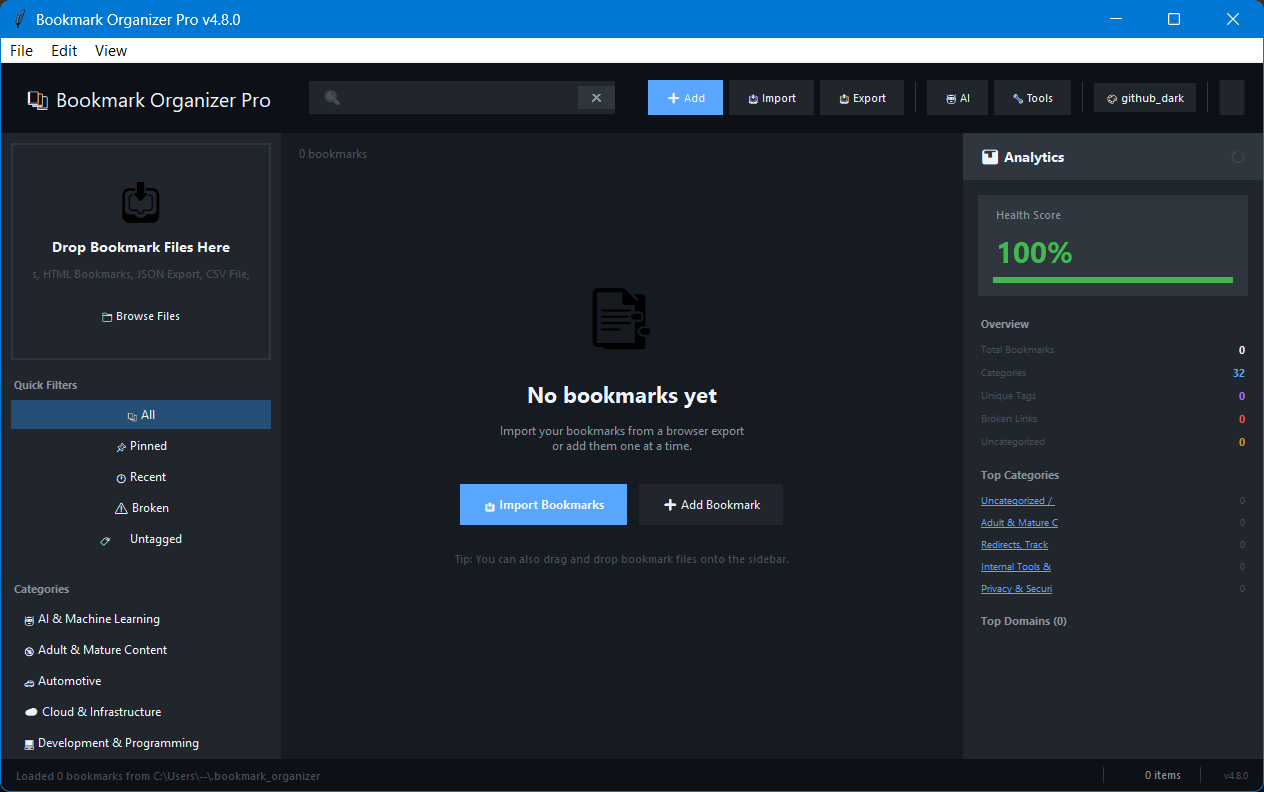
- Premium List Workspace: Dense, searchable bookmark table with zoom, command palette, and polished empty states
- Full-text Search: Advanced syntax with filters, boolean operators, and highlighting
- Undo/Redo: Full command history for all operations
AI Features
- Auto-categorization: AI suggests categories based on URL and content
- Tag Generation: Automatic tag suggestions using AI
- Title Improvement: Clean up and improve bookmark titles
- Content Summarization: Generate summaries for bookmarks
- Multiple Providers: OpenAI, Anthropic, Google Gemini, Groq, Ollama (local)
UI/UX
- 10+ Built-in Themes: GitHub Dark/Light, Dracula, Nord, Monokai, Tokyo Night, and more
- Custom Themes: Create, import, and export custom color schemes
- High DPI Support: Crisp rendering on high-resolution displays
- System Tray: Quick access without opening full window
- Keyboard Shortcuts: Complete keyboard navigation
- Command Palette: Quick access to all commands (Ctrl+P)
Data Management
- Automatic Backups: Timestamped backups with easy restore
- Export Options: HTML, JSON, CSV, OPML, XBEL, Markdown formats
- Soft Delete / Trash: Recoverable deletion with trash management
- URL Validation: Check for broken links with concurrent checking
- Smart Duplicate Detection: Academic-grade URL normalization (strips 60+ tracking params, normalizes scheme/host/port/path, sorts query params)
- Duplicate Merger: Auto-merge duplicates keeping best title, combined tags, earliest date, summed visits
- Favicon Caching: Fast, cached favicon display with multi-size support
Bookmark Intelligence
- Health Scoring: 0-100 health score per bookmark based on 7 factors (validity, title, tags, recency, categorization)
- Page Metadata Fetch: Auto-fetch title, description, and favicon from live URLs
- Wayback Machine Integration: Check archive.org for snapshots, submit pages for archival
- URL Normalization: RFC 3986 canonicalization for precise deduplication
- 4,200+ Categorization Patterns: 32 categories covering 3,400+ domains with 768 keyword fallbacks
- Redirect Detection: Link checker detects and offers to fix redirected URLs
- Batch Metadata Refresh: Multi-threaded re-fetch of all bookmark titles/descriptions
- Random Bookmark: Rediscover forgotten bookmarks
- Auto-Clean URLs: Strip tracking params transparently on add
Installation
Requirements
- Python 3.10 or higher
- Tkinter (usually included with Python)
Quick Start
# Clone or download the repository
git clone https://github.com/SysAdminDoc/Bookmark-Organizer-Pro.git
cd Bookmark-Organizer-Pro

# Run the application
python main.py
On first run, the application will:
- Check for required dependencies
- Show a dialog to install missing packages
- Create the data directory at
~/.bookmark_organizer/
Dependencies
Required (auto-installed):
beautifulsoup4- HTML parsing for bookmark importrequests- HTTP requests for favicon downloadstksheet- virtualized Tk table for large bookmark lists
Optional (recommended):
Pillow- Image processing for favicons and screenshotspystray- System tray integration
Manual Installation
pip install beautifulsoup4 requests tksheet Pillow pystrayUsage
Basic Operations
Adding Bookmarks
- Click the + Add button or press
Ctrl+N - Enter the URL (title auto-fetched)
- Select a category or let AI suggest one
- Add tags (optional)
- Click Save
Importing Bookmarks
- Click Import or press
Ctrl+I - Select your bookmark file(s)
- Choose import options (merge duplicates, etc.)
- Click Import
Supported formats:
- Chrome/Edge: Export as HTML from
chrome://bookmarks - Firefox: Export as HTML from Bookmarks Manager
- Safari: Export as HTML from File menu
- JSON: Bookmark Organizer Pro native format
- CSV: Spreadsheet format with URL, Title, Category columns
Searching
Use the search bar with advanced syntax:
python tutorial                    # Basic search
"machine learning"                 # Exact phrase
title:react                        # Search in title only
url:github.com                     # Search in URL only
tag:programming                    # Filter by tag
category:Development               # Filter by category
-deprecated                        # Exclude term
python AND tutorial                # Boolean AND
react OR vue                       # Boolean OR
Keyboard Shortcuts
| Shortcut | Action |
|---|---|
Ctrl+N |
Add new bookmark |
Ctrl+F |
Focus search |
Ctrl+L |
Focus search (alternative) |
Ctrl+I |
Import bookmarks |
Ctrl+O |
Import bookmarks (alternative) |
Ctrl+S |
Export bookmarks |
Ctrl+E |
Edit selected |
Ctrl+A |
Select all |
Ctrl+Z |
Undo |
Ctrl+Y |
Redo |
Ctrl+P |
Command palette |
Delete |
Delete selected |
F5 |
Refresh |
Escape |
Clear search / Close dialog |
AI Configuration
- Open the AI toolbar menu and choose AI Settings
- Select a provider (OpenAI, Anthropic, Google, Groq, or Ollama)
- Enter your API key if the provider requires one
- Select a model
- Click Test Connection to verify
- Click Save
Free Options:
- Groq: Free tier available at console.groq.com
- Google Gemini: Free tier at aistudio.google.com
- Ollama: Run models locally (free, requires setup)
Safety Notes
- Network tools skip private, localhost, and unsupported URL schemes to avoid leaking or fetching internal resources.
- AI API keys are stored locally in
~/.bookmark_organizer/ai_config.json; use environment variables if you prefer not to write keys into the app config file. - Imports, exports, settings, and category files are written defensively with atomic writes where supported.
Theme Customization
- Go to Settings > Theme Settings
- Browse available themes
- Click a theme to apply it
- To create a custom theme:
- Click Create Custom
- Choose a base theme
- Adjust colors using the color picker
- Save with a name
Configuration
File Locations
| File | Location | Purpose |
|---|---|---|
| Bookmarks | ~/.bookmark_organizer/master_bookmarks.json |
Main bookmark data |
| Categories | ~/.bookmark_organizer/categories.json |
Category definitions |
| Tags | ~/.bookmark_organizer/tags.json |
Tag definitions |
| Settings | ~/.bookmark_organizer/settings.json |
App preferences |
| AI Config | ~/.bookmark_organizer/ai_config.json |
AI provider settings |
| Themes | ~/.bookmark_organizer/themes/ |
Custom themes |
| Backups | ~/.bookmark_organizer/backups/ |
Automatic backups |
| Favicons | ~/.bookmark_organizer/favicons/ |
Cached favicons |
| Logs | ~/.bookmark_organizer/logs/ |
Application logs |
Settings File Format
{
  "theme": "github_dark",
  "view_mode": "list",
  "show_favicons": true,
  "confirm_delete": true,
  "auto_backup": true,
  "backup_count": 10,
  "sidebar_width": 250,
  "check_urls_on_import": false
}
Environment Variables
| Variable | Description |
|---|---|
BOOKMARK_DEBUG |
Set to 1 to enable console logging |
BOOKMARK_DATA_DIR |
Override data directory location |
Troubleshooting
Common Issues
"Module not found" errors
# Reinstall dependencies
pip install --upgrade beautifulsoup4 requests Pillow pystray
Favicons not loading
- Check internet connection
- Clear favicon cache: Tools > Clear Favicon Cache
- Check if domain blocks favicon requests
High CPU usage
- Disable URL validation on large imports
- Reduce favicon download concurrency in settings
Blurry text on Windows
The app should auto-detect DPI. If text is blurry:
- Right-click the Python executable
- Properties > Compatibility > Change high DPI settings
- Check "Override high DPI scaling behavior"
- Select "Application"
Import fails with encoding error
Try saving your bookmark file as UTF-8:
- Open in text editor
- Save As > Encoding: UTF-8
- Re-import
AI features not working
- Verify API key is correct
- Check internet connection
- Test connection in Settings > AI Configuration
- Check logs at
~/.bookmark_organizer/logs/
Log Files
Enable debug logging:
# Windows
set BOOKMARK_DEBUG=1
python main.py

# macOS/Linux
BOOKMARK_DEBUG=1 python main.py
Log file location: ~/.bookmark_organizer/logs/bookmark_organizer.log
Backup and Recovery
Create manual backup:
- Tools > Create Backup
Restore from backup:
- Tools > Restore from Backup
- Select a backup file from the list
- Confirm restoration
Automatic backups:
- Created on every save (if enabled)
- Stored in
~/.bookmark_organizer/backups/ - Named with timestamp:
bookmarks_backup_20260107_143052.json
Reset to Defaults
To completely reset the application:
# Backup your data first!
rm -rf ~/.bookmark_organizer

# On Windows:
rmdir /s %USERPROFILE%\.bookmark_organizer
API Reference
Command Line Interface
# Add a bookmark
python main.py add "https://example.com" --title "Example" --category "General"

# Search bookmarks
python main.py search "python tutorial"

# Export bookmarks
python main.py export --format html --output bookmarks.html

# Import bookmarks
python main.py import bookmarks.html

# List categories
python main.py categories

# Show statistics
python main.py stats
Python API
from bookmark_organizer_pro import (
    BookmarkManager,
    CategoryManager,
    TagManager,
    Bookmark
)

# Initialize managers
category_mgr = CategoryManager()
tag_mgr = TagManager()
bookmark_mgr = BookmarkManager(category_mgr, tag_mgr)

# Add a bookmark
bookmark = bookmark_mgr.add_bookmark(
    url="https://example.com",
    title="Example Site",
    category="General",
    tags=["example", "test"]
)

# Search bookmarks
results = bookmark_mgr.search("python")

# Get statistics
stats = bookmark_mgr.get_statistics()
print(f"Total bookmarks: {stats['total']}")
Contributing
Contributions are welcome! Please:
- Fork the repository
- Create a feature branch
- Make your changes
- Run tests (if available)
- Submit a pull request
Code Style
- Follow PEP 8 guidelines
- Use type hints for function signatures
- Add docstrings to public methods
- Use the existing logging system (
log.info(),log.error(), etc.)
License
MIT License - see LICENSE file for details.
Acknowledgments
- Theme color palettes inspired by popular editor themes
- Icons from various emoji sets
- Built with Python and Tkinter
Version History
v6.0.0 (April 2026)
Major release — see the What's new in v6.0.0 section above and CHANGELOG.md for the full list. Headlines:
- MCP server (
python -m bookmark_organizer_pro.mcp_server) — first OSS bookmark manager exposed via Model Context Protocol - Local semantic search via lancedb + fastembed/model2vec
- Hybrid keyword + semantic search via Reciprocal Rank Fusion
- Single-file HTML snapshot archiver (
monolith/single-file/ built-in) - Citation-aware AI summaries with click-to-source highlights
- Conversational RAG over collections
- NL → structured query smart collections
- Tag normalization linter
- Hybrid duplicate detector (URL + SimHash + embedding)
- Trafilatura ingest pipeline (reading time, language, content type)
- Per-bookmark ZIP exporter (Readeck-style)
- Encrypted-DB toggle (AES-256-GCM + PBKDF2)
- Scheduled dead-link scanner (background daemon)
- Daily digest (on-this-day, rediscover, stale-but-loved)
- Flows / research trails (ordered, annotated bookmark sequences)
- RSS / Atom ingestor with per-feed AI tagging modes
- Read-later as a first-class field
- 5 new importers (Pocket / Readwise / Pinboard / Instapaper / Reddit Saved)
- 20 new CLI subcommands
- 5 AI clients now expose generic
complete()for free-form generation
v5.2.2 (April 2026)
- Reliability & UX hardening pass across 14 files
- Stricter data/config validation and defensive model
from_dict - Atomic persistence and safer path handling in storage
- Extra SSRF / open-redirect guards in network paths
- Hardened import/export escaping across all formats
- Category tree auto-repair on load
- Search query parser hardened against malformed input
- UI feedback paths surface errors via log/toast instead of failing silently
- Expanded regression test coverage (
tests/test_core.py+166 lines)
v5.2.1 (April 2026)
- Repo cleanup: renamed
bookmark_organizer_pro_v4.py→main.py. The_v4suffix was misleading legacy from the v4.x line. The modularbookmark_organizer_pro/package is the canonical backend;main.pyis the UI entry point that imports from it. - Build spec / version_info metadata updated to reflect current version.
v5.2.0 (April 2026)
- Fixed HTML entity display bug — imported bookmark titles like "Love, Death & Robots" now correctly display "Love, Death & Robots"
html.unescape()applied to titles, URLs, folder names, and tags in all HTML-parsing importers (Netscape, Pocket, Raindrop, OPML)- Right sidebar Analytics panel widened 300 → 360px to prevent clipping at 115% default zoom
- Left sidebar widened 280 → 320px for consistent breathing room
- Zoom scaling now applies to ALL text (Tk named fonts + custom FONTS) so default launch is no longer cramped
v5.1.0 (April 2026)
- Ollama local LLM support — server URL field + auto-detect models in AI settings
- Ollama model catalog expanded: llama3.3, qwen3, phi4, gemma3, deepseek-r1, mixtral, codellama, command-r
- Default zoom bumped 100% → 115% for better readability on high-DPI displays
- Centralized FONTS dataclass now respects zoom multiplier
v5.0.0 (April 2026)
- 4,224 categorization patterns (3,405 domains + 768 keywords) — up from 1,963 (+115%)
- Researched top 3,000 websites via Cloudflare Radar, Similarweb, Tranco, and a parallel research pass
- All 32 categories at 23+ patterns, average 132 per category
- Security hardening: SSRF protection, path traversal guards, open redirect blocking, thread-safe BookmarkManager
- Premium UX: empty state, toast notifications, search placeholder, theme display names, drag-drop collapse
- 37-test suite covering Bookmark model, PatternEngine, URL normalization, SearchQuery, fuzzy match
- Removed 3,800+ lines of dead code (2 unused app classes, 2 unused FaviconManager classes, duplicate methods)
- GitHub Actions CI/CD for PyInstaller builds on Windows/macOS/Linux
- Import from Browser: auto-detect Chrome/Firefox/Edge/Brave profiles
- Atomic JSON writes for settings/tags persistence
- Favicon cache eviction (500MB limit)
- Fixed broken keyboard shortcuts (Ctrl+A, F5, Delete were never registered)
- Fixed custom theme persistence (ThemeManager load order bug)
- requirements.txt for standard pip workflows
v4.10.0 (April 2026)
- Removed 2,558 lines of dead code (BookmarkOrganizerApp + EnhancedBookmarkOrganizerApp)
- Added
requirements.txtfor standard pip/venv workflows - Added GitHub Actions CI/CD (PyInstaller builds for Windows/macOS/Linux on tag push)
- Import from Browser: detect and import directly from Chrome, Firefox, Edge, Brave profiles
- Search placeholder text ("Search bookmarks... Ctrl+F") with focus/blur behavior
- Theme dropdown shows display names (e.g., "GitHub Dark") instead of internal keys
- Drag-drop import area collapses to "Import more..." link after first successful import
v4.9.0 (April 2026)
- Premium UX polish pass
- Empty state: Beautiful centered empty state with icon, heading, and CTA buttons when no bookmarks exist
- Toast notifications: Non-blocking toast system replacing modal messageboxes for import/export/link-check feedback
- Category sidebar: Count badges separated from names, proper frame-based hover on full row
- Font consistency: Replaced all hardcoded "Segoe UI" font references with centralized FONTS system
- Fixed Image.Image type hint crash when Pillow not installed
- Build metadata: Corrected author/website to SysAdminDoc/GitHub
v4.8.0 (April 2026)
- Expanded categorization from 1,583 to 1,963 patterns (+380)
- Sports: 10 → 60 patterns (leagues, betting, fantasy, stats)
- Automotive: 9 → 60 patterns (brands, parts, reviews, repair)
- Food & Dining: 11 → 62 patterns (recipes, grocery, delivery, chains)
- Education: 17 → 64 patterns (MOOCs, textbooks, .edu catch-all, K-12)
- Social Media: 17 → 36 patterns (messaging, photo/video social)
- Added 100+ keyword fallbacks across all categories for long-tail coverage
v4.7.0 (April 2026)
- Modular extraction phase 2: AI providers, search engine, importers, link checker, URL utilities extracted to package (~2,010 lines moved)
- Main file reduced from 22,924 to 20,914 lines
- Package now exports 83 public names
- Fixed README clone URL and added version badge
- Fixed .gitignore (removed *.spec exclusion blocking PyInstaller spec)
v4.6.0 (April 2026)
- Expanded categorization from 150 to 894 patterns across 32 categories
- Added 5 new categories: SysAdmin & IT, Weather, Downloads & Torrents, Media Production, Software & Customization, Productivity
- Fixed PatternEngine domain matching (proper suffix matching instead of substring)
- Expanded icon mapping to 65+ keyword-to-emoji associations
v4.1.0 (January 2026)
- Added professional dependency management UI
- Added centralized StyleManager for consistent ttk styling
- Added DPI awareness for Windows high-DPI displays
- Added comprehensive logging system
- Added enhanced status bar with counts and progress
- Added comprehensive keyboard shortcuts
- Standardized font usage across application
- Fixed duplicate class definitions
- Fixed bare except clauses
- Code quality improvements
v4.0.0 (January 2026)
- Initial release with full feature set
- 10+ built-in themes
- AI-powered categorization and tagging
- Advanced search with boolean operators
- System tray integration
- Grid and list view modes
Building Standalone Executable
Prerequisites
# Install PyInstaller
pip install pyinstaller

# Install dependencies
pip install beautifulsoup4 requests tksheet Pillow pystray
Build Commands
Windows:
# Using spec file (recommended)
pyinstaller packaging/bookmark_organizer.spec --clean --noconfirm

# Or use the build script
scripts\build_windows.bat
macOS/Linux:
# Using spec file (recommended)
pyinstaller packaging/bookmark_organizer.spec --clean --noconfirm

# Or use the build script
chmod +x scripts/build_unix.sh
./scripts/build_unix.sh
Build Output
The executable will be created in the dist/ folder:
- Windows:
dist/BookmarkOrganizerPro.exe - macOS:
dist/BookmarkOrganizerPro(or .app bundle) - Linux:
dist/BookmarkOrganizerPro
Customizing the Build
Edit packaging/bookmark_organizer.spec to customize:
# Single file vs folder
# Default is single file. For folder, uncomment COLLECT section

# Console window
console=False  # Set to True for debugging

# UPX compression
upx=True  # Set to False if UPX not installed

# macOS app bundle
# Uncomment BUNDLE section for .app creation
Build Size Optimization
The spec file already excludes unnecessary packages. For smaller builds:
- Use UPX: Install UPX and ensure
upx=Truein spec - Remove unused features: Comment out unused hidden_imports
- Strip debug info: Set
strip=True(may cause issues on some systems)
Icon Files
The distribution includes these icon files:
assets/bookmark_organizer.ico- Windows executable iconassets/bookmark_organizer.png- Cross-platform icon (256x256)
Code Signing (Optional)
Windows:
signtool sign /f certificate.pfx /p password /t http://timestamp.url dist\BookmarkOrganizerPro.exemacOS:
codesign --deep --force --verify --verbose --sign "Developer ID" dist/BookmarkOrganizerPro.appFile Manifest
| File | Description |
|---|---|
main.py |
UI entry point (Tk app). Imports backend from bookmark_organizer_pro/ |
bookmark_organizer_pro/ |
Modular backend package (models, core, utils, importers, AI, search, link checker, URL utils) |
assets/ |
Source-controlled app icons and README screenshot |
packaging/bookmark_organizer.spec |
PyInstaller build specification |
packaging/version_info.txt |
Windows version metadata |
scripts/build_windows.bat |
Windows build script |
scripts/build_unix.sh |
macOS/Linux build script |
scripts/clean_workspace.py |
Removes generated caches/build output |
docs/REPOSITORY_STRUCTURE.md |
Repository layout guide |
docs/ARCHITECTURE.md |
Architecture boundaries and refactor map |
README.md |
This documentation |