


📦 MSStoreHelper
A GUI tool to download and install Microsoft Store apps without needing the Microsoft Store. Perfect for Windows LTSC editions, restricted environments, or when the Store just won't cooperate.




✨ Features
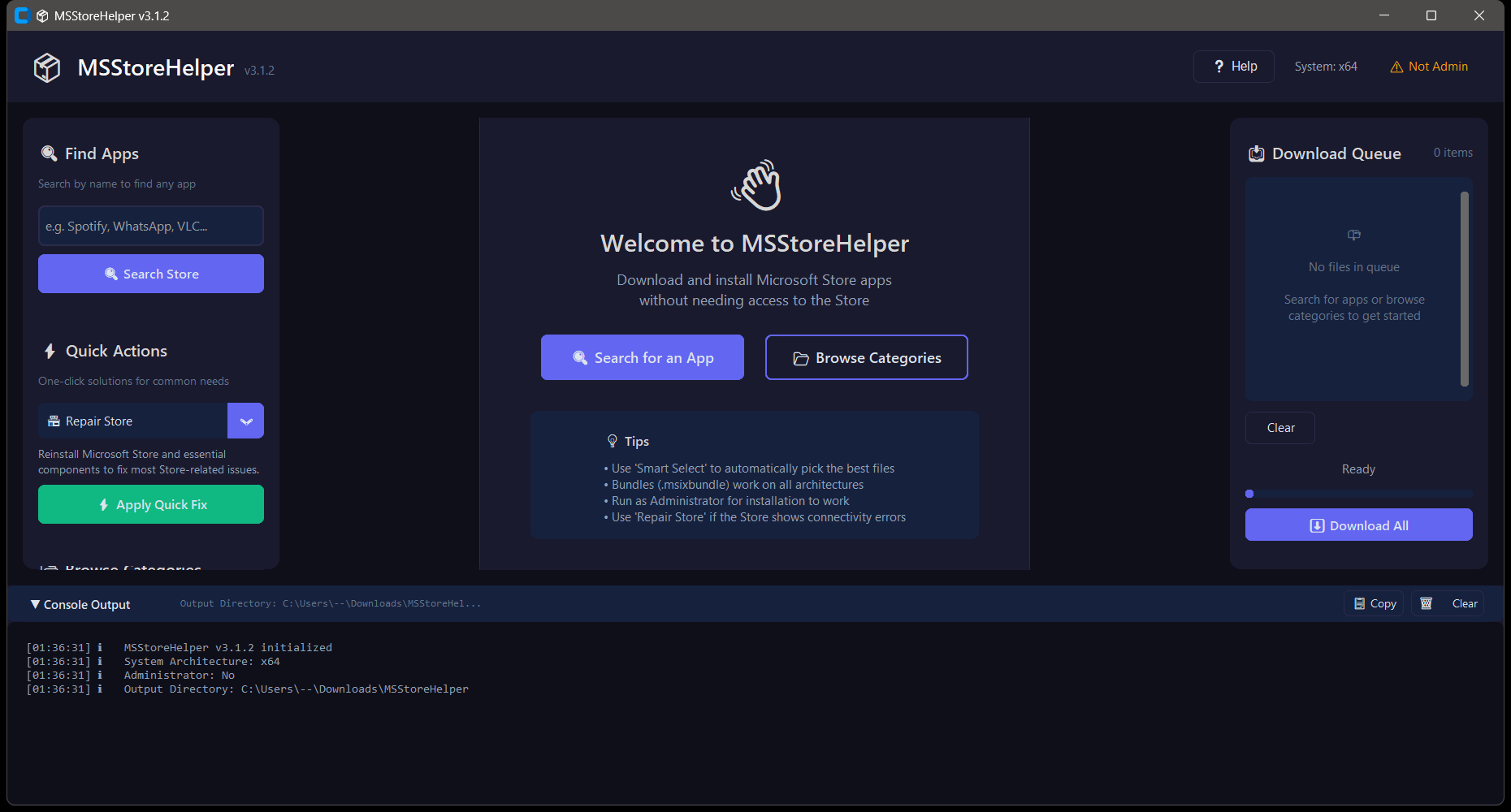
- 🔍 Search the Microsoft Store - Find any app by name using the official Microsoft API
- 📂 Browse Categories - Quick access to essential apps, gaming, productivity, dev tools & more
- ⚡ Quick Fix Presets - One-click solutions for common needs (Repair Store, Gaming Setup, Media Codecs)
- ✨ Smart Select - Automatically picks the best packages (bundles, correct architecture, newest versions)
- 📥 Download Queue - Queue multiple packages with progress tracking
- 📦 Install Packages - Install downloaded apps directly (requires Admin)
- 🔧 Store Repair - Built-in repair tool for Microsoft Store connectivity issues
- 📋 Verbose Console - Detailed logging with error hints and troubleshooting tips
🖥️ Requirements
- Windows 10/11 (including LTSC editions)
- Python 3.8+
- Administrator rights (for installation only)
Dependencies are auto-installed on first run:
customtkinter- Modern UI frameworkrequests- HTTP clientbeautifulsoup4- HTML parsingpackaging- Version comparison
🚀 Quick Start
Option 1: Run Directly
# Clone or download
git clone https://github.com/SysAdminDoc/MSStoreHelper.git
cd MSStoreHelper

# Run (dependencies auto-install)
python MSStoreHelper.py
Option 2: Run as Admin (for installation features)
# Right-click PowerShell → Run as Administrator
python MSStoreHelper.py
📖 How to Use
🔍 Finding Apps
- Search by Name: Type an app name (e.g., "Spotify", "VLC", "Firefox") and click Search
- Browse Categories: Click a category in the sidebar to see curated app lists
- Quick Actions: Use presets for common tasks like repairing the Store or setting up gaming
📦 Downloading Packages
- Click "Get Files" on any search result, or select multiple apps and click "Get Selected Apps"
- Review the available packages (bundles, different architectures, versions)
- Click "✨ Smart Select" to automatically pick the best files
- Click "➕ Add to Queue" to add selected packages to the download queue
- Click "⬇️ Download All" to start downloading
📦 Installing Packages
- After downloading, click "📦 Install Downloaded"
- Note: Requires Administrator privileges
- Check the console output for any errors or hints
🔧 Repairing the Store
If you see errors like "The server stumbled" or "needs to be online":
- Click "🔧 Repair Store" in the sidebar
- Confirm the repair operation
- Restart your PC when prompted
💡 Tips
| Tip | Description |
|---|---|
| Use Bundles | Files ending in .msixbundle or .appxbundle work on all architectures |
| Avoid Encrypted | Skip .eappx and .emsix files - they won't install without a license |
| Install Dependencies First | Install VCLibs and .NET packages before main apps |
| Check Windows Version | Some apps require Windows 11 - check the console for compatibility errors |
| Smart Select | Let the tool pick the best packages automatically |
⚠️ Common Errors
| Error Code | Meaning | Solution |
|---|---|---|
0x80073CFD |
App requires newer Windows | App incompatible - try older version |
0x80073D06 |
Higher version installed | No action needed - you have a newer version |
0x80073D02 |
Package in use | Close the app and retry |
0x80073D19 |
Missing dependency | Install VCLibs/.NET first |
0x80073CFF |
Sideloading disabled | Enable Developer Mode in Windows Settings |
0x80073CF3 |
Already installed | App already exists |
🏗️ How It Works
MSStoreHelper uses two APIs:
Microsoft Store Search API (
storeedgefd.dsx.mp.microsoft.com)- Same API used by WinGet and Intune
- Returns app metadata and Package IDs
RG-AdGuard Store API (
store.rg-adguard.net)- Provides direct download links for Store packages
- Returns all available versions and architectures
Packages are downloaded to %USERPROFILE%\Downloads\MSStoreHelper and installed using PowerShell's Add-AppxPackage cmdlet.
📁 Project Structure
MSStoreHelper/
├── MSStoreHelper.py    # Main application
├── README.md           # This file
├── LICENSE             # MIT License
└── screenshots/        # Screenshots for README
    ├── main.png
    ├── search.png
    ├── packages.png
    └── console.png
🔧 Configuration
Default settings can be modified at the top of MSStoreHelper.py:
APP_VERSION = "3.2.0"
DEFAULT_OUTPUT = os.path.join(os.environ['USERPROFILE'], "Downloads", "MSStoreHelper")
📋 App Catalog
The built-in catalog includes:
| Category | Apps |
|---|---|
| 🛠️ Essential Repairs | Microsoft Store, App Installer, Xbox Identity |
| ⚙️ System Components | VC++ Runtime, HEVC Codec, AV1 Codec, WebP |
| 💻 Productivity | Windows Terminal, PowerToys, Notepad, Calculator, Snipping Tool, Photos |
| 🎮 Gaming | Xbox App, Xbox Game Bar, Gaming Services |
| 🌐 Browsers | Firefox, Brave |
| 🛠️ Developer Tools | VS Code, Python 3.12, PowerShell 7, WSL |
🤝 Contributing
Contributions are welcome! Please feel free to submit a Pull Request.
- Fork the repository
- Create your feature branch (
git checkout -b feature/AmazingFeature) - Commit your changes (
git commit -m 'Add some AmazingFeature') - Push to the branch (
git push origin feature/AmazingFeature) - Open a Pull Request
📄 License
This project is licensed under the MIT License - see the LICENSE file for details.
🙏 Acknowledgments
- RG-AdGuard - For providing the package download API
- CustomTkinter - For the modern UI framework
- Microsoft - For the Store search API
⚠️ Disclaimer
This tool is provided as-is for legitimate use cases such as:
- Installing apps on Windows LTSC editions
- Offline/restricted environments
- Troubleshooting Store issues
Always download apps from official sources. The author is not responsible for any misuse of this tool.
Made with ❤️ for the Windows LTSC community