


Wingetter
A powerful PowerShell GUI application for discovering, selecting, and bulk installing Windows software using Windows Package Manager (winget). Think Ninite, but with 765 apps and full winget integration.



Quick Launch
irm "https://raw.githubusercontent.com/SysAdminDoc/Wingetter/main/Wingetter.ps1" | iexPaste the above into any PowerShell window to download and run Wingetter instantly. No installation required.
Features
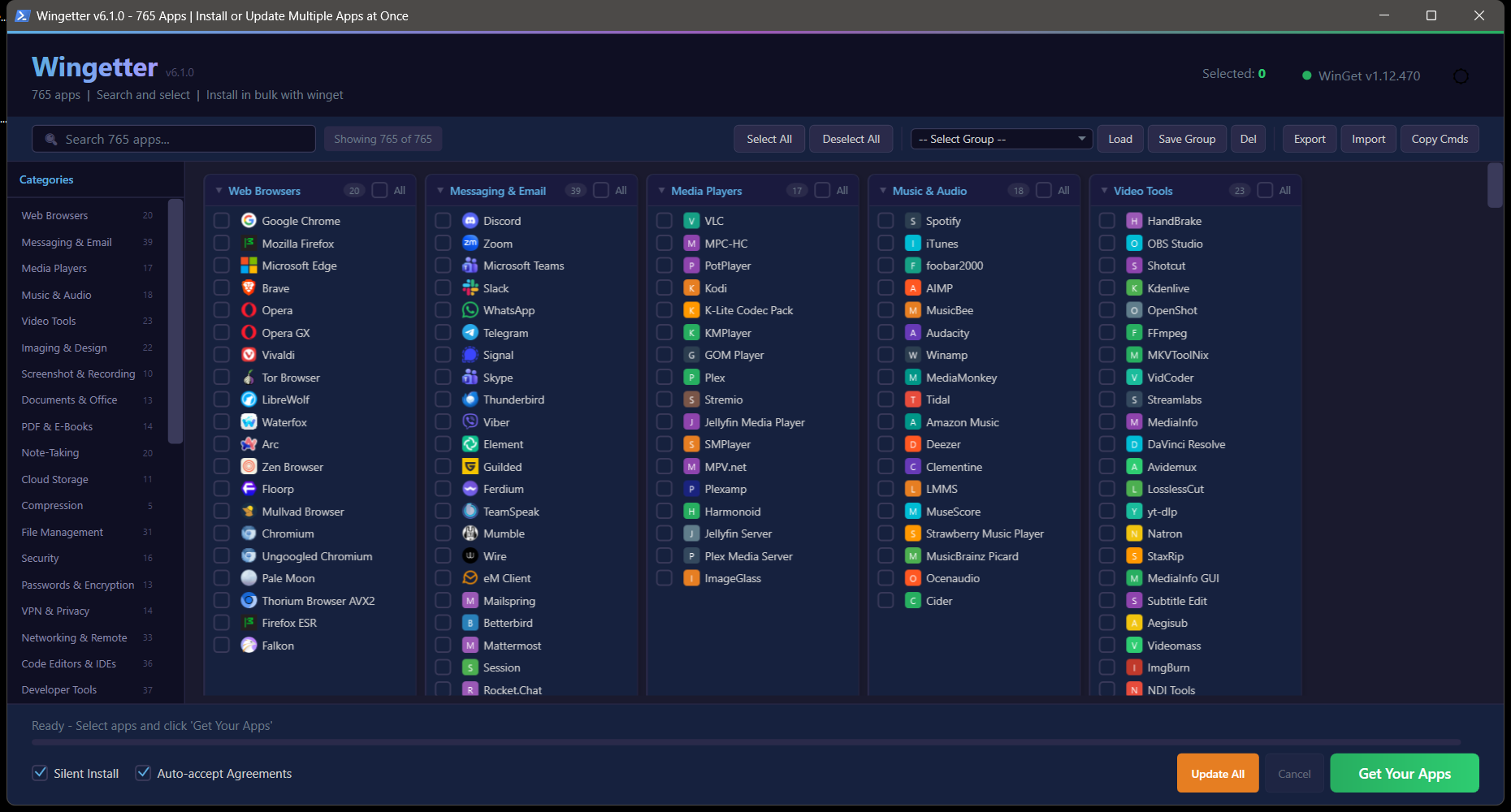
765 applications across 39 categories with a polished WPF interface:
- Dark / Light mode -- defaults to dark, toggle with one click
- Metadata-rich search -- ranked local search across names, package IDs, categories, built-in groups, publisher-like ID tokens, installed state, source, scope, update state, and pin state
- Favicon icons -- parallel-fetched from app domains with colored letter fallbacks and local caching
- Bulk install -- select any combination and install them all in sequence via winget
- Update mode -- toggle between Install and Update mode to upgrade already-installed apps
- Installed app detection -- background scan prefers
Microsoft.WinGet.Client, falls back towinget list, and caches detected versions under%APPDATA%\Wingetter - Package trust details -- click an app to inspect source, publisher, installed/latest version, installer type, URL, SHA256, and metadata warnings
- WinGet pin controls -- inspect pin state, add standard/blocking/installed-version pins, remove pins, and opt into pinned updates
- Corporate source policy -- optional allowed-source mode can block packages outside trusted sources and export
winget source addcommands, including explicitMicrosoft.Restprivate sources - Silent install & auto-accept agreements -- toggleable checkboxes for hands-free deployment
- Copy command -- grab the raw
winget installcommands to clipboard - Save / Load groups -- persist custom selections as named groups for reuse
- Profile Gallery -- browse checked-in public profiles, verify SHA256 hashes, review every package ID/source, and import only as a selection
- Export as PS1, Wingetter JSON, official WinGet JSON, or WinGet Configuration -- generate standalone installer scripts, reusable Wingetter group profiles, files usable with
winget import, or declarative.wingetconfiguration files - Import JSON profiles -- load official WinGet export/import JSON, Wingetter group JSON, or simple package ID arrays
- 10 built-in quick-select groups -- one-click presets for common setups
- Category sidebar -- quick-jump navigation panel for all 39 categories
- Collapsible categories -- click any category header to collapse/expand
- Shift-click range selection -- hold Shift to select a range of apps at once
- Enhanced tooltips -- hover to see app name and WingetId
- Install log panel -- color-coded per-app results (success/skipped/failed) with summary
- Structured run logs -- per-package stdout, stderr, and JSON result records under
%APPDATA%\Wingetter\logs - Migration reports -- completed install/update runs create exportable Markdown or JSON reports with summary counts, commands, result paths, versions, and sources
- Scheduled update checks -- optional Windows scheduled task checks for available updates, respects pins/source policy, can skip metered networks, rotates logs, and never auto-installs
- Offline download cache -- download selected installers with
winget download, write an offline manifest, and generate a replay script for later installer launch - Toast notifications -- Windows notification when batch install completes
- Splash screen -- loading progress indicator while icons are fetched
- Select All / Deselect All per category or globally
- WinGet auto-detection -- checks for winget on launch and offers to install it if missing
- Audited WinGet repair -- uses App Installer registration and
Microsoft.WinGet.Clientrepair with JSONL bootstrap logs instead of raw package downloads
Built-in Groups
Pre-configured package groups for common use cases:
| Group | Description |
|---|---|
| Essential PC Setup | Chrome, Firefox, 7-Zip, VLC, Notepad++, Everything, and more |
| Web Developer | VS Code, Git, Node.js, Docker, Postman, Windows Terminal |
| Python Developer | VS Code, Git, Python 3.13, Miniconda, PyCharm, DBeaver |
| Creative Suite | GIMP, Krita, Inkscape, Blender, OBS, DaVinci Resolve |
| Gaming PC | Steam, Discord, Epic, GOG, Playnite, Moonlight, Sunshine |
| Privacy & Security | Firefox, Mullvad Browser, Bitwarden, ProtonVPN, VeraCrypt, simplewall |
| System Admin | PowerShell 7, Windows Terminal, WinSCP, PuTTY, Sysinternals |
| Streaming Setup | OBS, Streamlabs, VoiceMeeter, Discord, ShareX, FFmpeg |
| Office & Productivity | LibreOffice, Thunderbird, Bitwarden, Todoist, Obsidian, PDF24 |
| 3D Printing Workshop | Cura, PrusaSlicer, Bambu Studio, OrcaSlicer, FreeCAD, OpenSCAD |
Categories
| Category | Apps | Category | Apps | |
|---|---|---|---|---|
| System Utilities | 54 | Runtimes & SDKs | 52 | |
| Messaging & Email | 39 | Developer Tools | 37 | |
| CLI Tools | 37 | Code Editors & IDEs | 36 | |
| Networking & Remote | 33 | Hardware & Diagnostics | 32 | |
| File Management | 31 | Gaming | 28 | |
| Desktop Customization | 23 | Video Tools | 23 | |
| Imaging & Design | 22 | Note-Taking | 20 | |
| Web Browsers | 20 | Music & Audio | 18 | |
| Media Players | 17 | Cloud & DevOps | 16 | |
| Security | 16 | Science & Education | 15 | |
| Productivity | 14 | VPN & Privacy | 14 | |
| PDF & E-Books | 14 | Passwords & Encryption | 13 | |
| Documents & Office | 13 | Other | 13 | |
| Emulators | 12 | Audio Production | 11 | |
| Cloud Storage | 11 | AI & LLM Tools | 11 | |
| 3D Printing & CAD | 10 | Screenshot & Recording | 10 | |
| Terminals & Shells | 10 | Backup & Sync | 9 | |
| VC++ Redistributables | 8 | Database Tools | 8 | |
| Virtualization | 7 | Compression | 5 | |
| Package Managers | 3 |
Requirements
- Windows 10 / 11
- PowerShell 5.1+ (ships with Windows 10+)
- Windows Package Manager (winget) -- Wingetter will detect and offer to install it if missing
- Internet connection for package installation and icon fetching
Usage
Quick Start
# Run directly
.\Wingetter.ps1

# Or from anywhere
powershell -ExecutionPolicy Bypass -File "C:\Path\To\Wingetter.ps1"
Workflow
- Launch the script -- the splash screen loads while icons are fetched
- Browse categories using the sidebar or use the search bar to find apps
- Check the boxes for everything you want to install (Shift-click for range selection)
- Optionally toggle Silent Install and Auto-accept Agreements
- Click Install Selected to kick off the batch install
- Review results in the log panel -- color-coded per app
- Save your selection as a named group for next time, or export it as a standalone PS1/JSON
Exporting
Export as WinGet Import JSON creates an official winget import compatible file with Sources, Packages, and PackageIdentifier entries.
Export as Wingetter Group JSON creates a portable Wingetter profile that can be imported back into Wingetter on any machine.
Export as PS1 generates a self-contained PowerShell script that installs your selected packages with no dependencies -- hand it to a coworker or drop it in your deployment pipeline.
Export as WinGet Configuration creates a declarative .winget file using Microsoft.WinGet.DSC/WinGetPackage resources. Validate it with winget configure validate -f .\configuration.winget --disable-interactivity before applying it on another machine.
Export Report becomes available after an install or update run and writes a migration report as Markdown or JSON. The report includes selected packages, status counts, commands, result log paths, installed/available versions, sources, scan timestamps, and import warnings when applicable.
Import JSON accepts official WinGet import/export JSON, Wingetter group JSON, or a simple JSON array of package IDs. Packages not present in the Wingetter catalog are reported and skipped during selection.
Profile Gallery opens the read-only checked-in profile index from profiles/gallery.json. Each profile file under profiles/gallery/ must match its SHA256 hash, may contain only package IDs/names/sources, and is imported only after the package review dialog is accepted. Gallery import selects packages in Wingetter; it never starts install or update.
Corporate source policy is stored at %APPDATA%\Wingetter\source-policy.json. Enable Corporate policy in the footer to refuse selected packages whose source is not listed in that policy. Export Sources writes the current policy plus reproducible winget source add commands for allowed and private sources.
Scheduled Update Checks
Run a one-time check without installing updates:
powershell -NoProfile -ExecutionPolicy Bypass -File .\tools\Invoke-UpdateCheck.ps1 -SkipMeteredNetwork -ToastRegister a daily current-user scheduled task:
powershell -NoProfile -ExecutionPolicy Bypass -File .\tools\Register-UpdateWatcher.ps1 -DailyAt 09:00Update-check logs are written under %APPDATA%\Wingetter\logs\update-checks.
Offline Download Cache
Use Download Cache in the toolbar, or run:
powershell -NoProfile -ExecutionPolicy Bypass -File .\tools\Invoke-OfflineCache.ps1 -PackageId Google.Chrome,Mozilla.Firefox -AcceptAgreementsThe cache folder contains offline-manifest.json, per-package download metadata, and install-offline.ps1.
Catalog Validation
The repo includes generated catalog snapshots in catalog/ and validation tools in tools/:
powershell -NoProfile -ExecutionPolicy Bypass -File .\tools\Sync-EmbeddedCatalog.ps1
powershell -NoProfile -ExecutionPolicy Bypass -File .\tools\Test-Catalog.ps1
powershell -NoProfile -ExecutionPolicy Bypass -File .\tools\Test-ProfileJson.ps1
powershell -NoProfile -ExecutionPolicy Bypass -File .\tools\Test-ProfileGallery.ps1
powershell -NoProfile -ExecutionPolicy Bypass -File .\tools\Test-WinGetRunner.ps1
powershell -NoProfile -ExecutionPolicy Bypass -File .\tools\Test-SearchMetadata.ps1
powershell -NoProfile -ExecutionPolicy Bypass -File .\tools\Test-PackageSources.ps1
powershell -NoProfile -ExecutionPolicy Bypass -File .\tools\Test-SourcePolicy.ps1
powershell -NoProfile -ExecutionPolicy Bypass -File .\tools\Test-UpdateWatcher.ps1
powershell -NoProfile -ExecutionPolicy Bypass -File .\tools\Test-OfflineCache.ps1
powershell -NoProfile -ExecutionPolicy Bypass -File .\tools\Test-ConfigurationExport.ps1
powershell -NoProfile -ExecutionPolicy Bypass -File .\tools\Test-VisualAccessibility.ps1
powershell -NoProfile -ExecutionPolicy Bypass -STA -File .\tools\Test-Xaml.ps1
Wingetter.ps1 is the launcher. Runtime code lives in src/Wingetter.Common.ps1, src/Wingetter.Catalog.ps1, src/Wingetter.WinGet.ps1, src/Wingetter.Groups.ps1, src/Wingetter.ProfileGallery.ps1, src/Wingetter.Sources.ps1, src/Wingetter.OfflineCache.ps1, src/Wingetter.Configuration.ps1, src/Wingetter.UpdateWatcher.ps1, src/Wingetter.Ui.ps1, and src/Wingetter.App.ps1. The raw GitHub quick-launch command still works: when a local src/ directory is not available, the launcher downloads those modules from the configured raw source URL.
catalog/winget.json and catalog/groups.json are the curation files. Sync-EmbeddedCatalog.ps1 regenerates the embedded fallback data in the catalog and group modules, and Test-Catalog.ps1 checks launcher/module parse health, version agreement, unique package IDs, built-in group references, embedded fallback freshness, README counts, and changelog formatting.
Contributing
Contributions are welcome. To add applications to the database, edit catalog/winget.json, run tools\Sync-EmbeddedCatalog.ps1, and then run tools\Test-Catalog.ps1. Each module fallback entry follows this format:
@{ Name = "App Name"; WingetId = "Publisher.PackageName"; Icon = "${f}domain.com" }The ${f} variable expands to the Google Favicon API prefix. Use the app's primary domain for the best icon match.
License
MIT
Made with PowerShell and too much caffeine.