


StormView Radar
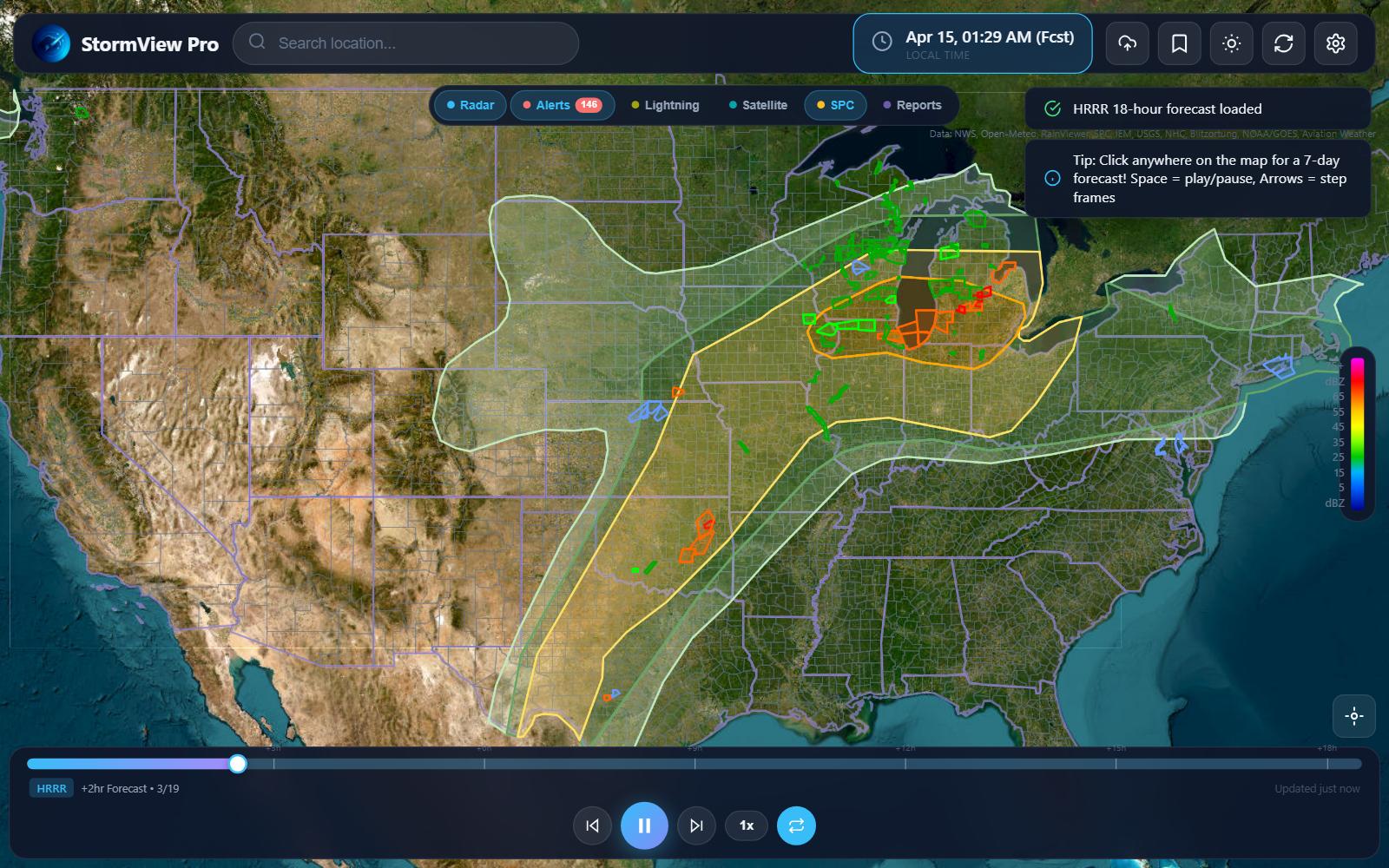
A modern, feature-rich weather radar visualization application built with vanilla JavaScript and Leaflet. Track severe weather in real-time with animated radar, NWS alerts, storm reports, and more.
⛈️ **Launch StormView Radar** ⛈️

Features
Radar & Animation
- Dual Radar Sources — Switch between RainViewer (global, animated) and MRMS (US, real-time)
- Hybrid High-Res Mode — Automatic MRMS enhancement at high zoom levels (US only)
- Smooth Animation — Play, pause, and step through radar frames with customizable speed (0.5x–3x)
- Nowcast/Forecast — View predicted precipitation up to 30 minutes ahead
- 8 Color Schemes — Choose from multiple radar color palettes
- Adjustable Opacity — Fine-tune radar transparency for optimal map visibility
- Smart Tile Caching — Optimized loading with rate limit protection
Weather Layers
- NWS Alerts — Real-time watches, warnings, and advisories with color-coded polygons
- SPC Outlooks — Storm Prediction Center convective outlooks
- Storm Reports — View tornado, hail, and wind damage reports
- Lightning — Near real-time lightning strike data
- Satellite — GOES satellite imagery overlay
- River Gauges — USGS water level monitoring stations
- Surface Observations — METAR station data display
Additional Overlays (API Required)
- Temperature — OpenWeatherMap temperature layer
- Wind — Wind speed and direction visualization
- Clouds — Cloud cover overlay
- Pressure — Atmospheric pressure visualization
Map Customization
- 5 Basemap Styles — Dark, light, terrain, satellite, and streets
- State & County Borders — Toggleable political boundaries
- City Labels — Optional place name labels
- Highway Overlay — Road network visualization
User Experience
- Dark/Light Theme — Full theme support with smooth transitions
- Location Search — Find any location with OpenStreetMap geocoding
- Geolocation — Jump to your current position with one click
- Mobile Optimized — Responsive design with bottom sheet navigation on mobile
- Keyboard Shortcuts — Quick controls for power users
- Settings Persistence — All preferences saved to localStorage
- Import/Export — Backup and restore your configuration
Quick Start
- Download or clone the repository
- Open
index.htmlin any modern browser - Done! — No build process or dependencies required
git clone https://github.com/sysadmindoc/StormviewRadar.git
cd StormviewRadar
# Open index.html in your browser
Note: When running locally from
file://, RainViewer may be unavailable due to CORS restrictions. The app automatically falls back to MRMS radar in this case. For full functionality, serve via a local web server or use the hosted version.
Keyboard Shortcuts
| Key | Action |
|---|---|
Space |
Play/Pause animation |
← |
Previous frame |
→ |
Next frame |
R |
Refresh radar data |
API Keys (Optional)
Some features require free API keys:
OpenWeatherMap
Required for temperature, wind, clouds, and pressure layers.
- Sign up at openweathermap.org
- Copy your API key
- Paste in Settings → API tab
Data Sources
| Layer | Source | Update Frequency |
|---|---|---|
| Radar | RainViewer | ~10 minutes |
| MRMS | Iowa State Mesonet | ~2 minutes |
| Alerts | NWS API | Real-time |
| SPC Outlook | SPC | Daily |
| Storm Reports | SPC | As reported |
| Lightning | Iowa State Mesonet | ~5 minutes |
| Satellite | GOES East (IEM) | ~15 minutes |
| River Gauges | USGS | Varies |
Browser Support
- Chrome 80+
- Firefox 75+
- Safari 13+
- Edge 80+
Technology Stack
- Leaflet — Interactive mapping
- OpenStreetMap — Base map tiles and geocoding
- Vanilla JS — No frameworks, no build tools
- CSS Variables — Dynamic theming
- LocalStorage — Settings persistence
Performance Optimizations
StormView includes several optimizations for smooth performance:
- Batched Frame Loading — Radar frames load in small batches to avoid rate limiting
- Custom Cached TileLayer — Extended Leaflet TileLayer with intelligent caching
- Seamless Zoom — Tiles remain visible during zoom, new tiles load in background
- Memory Management — Only nearby frames kept in memory during animation
- Graceful Error Handling — Failed tiles display transparently without broken image icons
Configuration Options
Access the settings panel (⚙️) to customize:
General
- Theme (dark/light)
- Show legend
- Border widths and opacity
Radar
- Opacity (30%–100%)
- High-res mode (MRMS enhancement)
- Smooth interpolation
- Snow color mode
- Color scheme selection
- Frame delay (200ms–1200ms)
- Auto-refresh (5 min interval)
- Loop animation
Project Structure
StormviewRadar/
├── index.html          # Single-file application
├── README.md           # Documentation
├── LICENSE             # MIT License
└── logo/               # App icons and favicons
    ├── StormView.ico
    ├── StormView-16x16.png
    ├── StormView-32x32.png
    ├── StormView-48x48.png
    ├── StormView-64x64.png
    ├── StormView-96x96.png
    ├── StormView-128x128.png
    ├── StormView-192x192.png
    └── StormView-512x512.png
Contributing
Contributions are welcome! Please feel free to submit a Pull Request.
- Fork the repository
- Create your feature branch (
git checkout -b feature/AmazingFeature) - Commit your changes (
git commit -m 'Add some AmazingFeature') - Push to the branch (
git push origin feature/AmazingFeature) - Open a Pull Request
License
This project is licensed under the MIT License — see the LICENSE file for details.
Acknowledgments
- RainViewer for radar data API
- Iowa State Mesonet for MRMS, lightning, and satellite data
- National Weather Service for alerts and forecasts
- Storm Prediction Center for severe weather outlooks
- USGS for river gauge data
- Leaflet for the mapping library
- OpenStreetMap contributors
- CARTO for basemap tiles
StormView Radar — Track storms like a pro. ⛈️