
DefenderShield



Windows Defender & Firewall Repair Tool
Restore Windows security components after privacy tools have disabled them
Overview
DefenderShield is a comprehensive repair tool designed to restore Windows Defender and Windows Firewall after they've been disabled by privacy tools like privacy.sexy, O&O ShutUp10, Windows debloaters, or manual registry modifications.
Many users run privacy scripts to reduce telemetry but accidentally disable critical security components. DefenderShield reverses these changes with a simple GUI interface, letting you choose exactly which components to restore.
Features
🔥 Windows Firewall Repair
- Restores firewall service registry configurations
- Removes Group Policy blocks
- Enables all firewall profiles (Domain, Private, Public)
- Resets firewall to default settings
- Starts dependent services in correct order (BFE → mpssvc → IKEEXT → PolicyAgent)
🛡️ Windows Defender Repair
- Restores all Defender service registry keys
- Removes 20+ known disabling registry values from Policy and direct paths
- Repairs Defender driver configurations (WdFilter, WdBoot, WdNisDrv)
- Re-enables disabled scheduled tasks
- Detects and removes malicious scheduled tasks that re-disable Defender
- Checks for and removes WMI event subscriptions targeting Defender
- Resets local Group Policy blocking Defender
- Re-registers Windows Security UWP app
- Enables all protection features via Set-MpPreference
- Triggers signature update
🎯 Additional Features
- Selective Repair: Choose to repair Firewall only, Defender only, or both
- System Restore Point: Optionally creates a restore point before making changes
- Comprehensive Logging: Detailed log saved to Desktop
- Registry Backup: Backs up registry keys before modification
- Error Resilient: Continues execution even if individual operations fail
- Auto-Elevation: Automatically requests administrator privileges
Screenshots
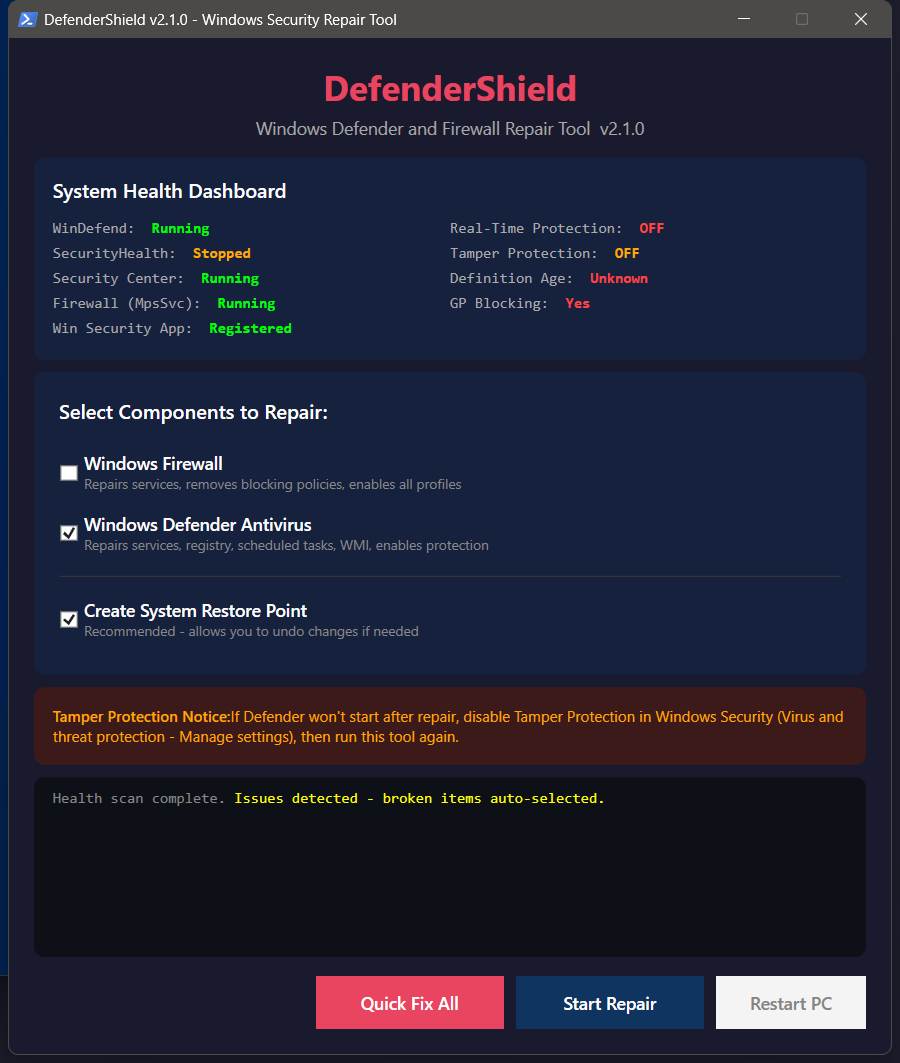
Main Interface

Requirements
- OS: Windows 10 / Windows 11
- Privileges: Administrator
- PowerShell: 5.1 or later (included with Windows)
Installation
- Download
DefenderShield.ps1from the Releases page - Save to a convenient location (e.g., Desktop)
Usage
Method 1: Right-Click Run
- Right-click
DefenderShield.ps1 - Select Run with PowerShell
- If prompted by UAC, click Yes
Method 2: PowerShell Direct
Set-ExecutionPolicy -ExecutionPolicy Bypass -Scope Process -Force
.\DefenderShield.ps1
Using the Interface
Select components to repair using the checkboxes:
- ✅ Windows Firewall
- ✅ Windows Defender Antivirus
- ✅ Create System Restore Point (recommended)
Click Start Repair
Watch the status output for progress
When complete, click Restart PC (recommended)
Important Notes
Tamper Protection
If Windows Defender won't start after repair, you may need to:
- Open Windows Security
- Go to Virus & threat protection → Manage settings
- Turn OFF Tamper Protection
- Run DefenderShield again
- Turn Tamper Protection back ON
Tamper Protection is a security feature that prevents programs from modifying Defender settings. While it protects against malware, it also blocks legitimate repair tools.
What Gets Repaired
| Component | Registry Keys | Services | Policies | Tasks |
|---|---|---|---|---|
| Firewall | ✅ | ✅ | ✅ | — |
| Defender | ✅ | ✅ | ✅ | ✅ |
Registry Values Removed
The tool removes/resets these common blocking values:
Policy Keys (HKLM:\SOFTWARE\Policies\Microsoft\Windows Defender\...)
DisableAntiSpywareDisableAntiVirusDisableRealtimeMonitoringDisableBehaviorMonitoringDisableOnAccessProtectionDisableIOAVProtectionDisableScanOnRealtimeEnable- And more...
Direct Keys (HKLM:\SOFTWARE\Microsoft\Windows Defender\...)
- Same values as above in the non-policy locations
Troubleshooting
"Script won't run" / Execution Policy Error
Set-ExecutionPolicy -ExecutionPolicy Bypass -Scope Process -Force"Services won't start"
- Restart your computer after running DefenderShield
- Check if Tamper Protection needs to be temporarily disabled
- Some deep modifications require Safe Mode to fully reverse
"Defender still shows as disabled"
- Ensure Tamper Protection is OFF
- Run DefenderShield again
- Restart computer
- Check Windows Security app
"Firewall won't enable"
- Ensure no third-party firewall is installed (they often disable Windows Firewall)
- Check if antivirus software is managing the firewall
Files Created
| File | Location | Purpose |
|---|---|---|
DefenderShield_[timestamp].log |
Desktop | Detailed operation log |
DefenderShield_Backup_[timestamp]/ |
Desktop | Registry backups |
Privacy & Safety
- ✅ No data collection - Everything runs locally
- ✅ No network requests - Except Windows Update signature downloads
- ✅ Open source - Full source code available for review
- ✅ Creates backups - Registry exported before changes
- ✅ Restore point - Optional system restore point creation
Contributing
Contributions are welcome! If you find a privacy tool that breaks Defender/Firewall in a way DefenderShield doesn't fix:
- Note the exact tool and settings used
- Check which registry keys were modified
- Open an issue with the details
License
This project is licensed under the MIT License - see the LICENSE file for details.
Disclaimer
This tool modifies Windows system settings and registry values. While it creates backups and is designed to be safe:
- Use at your own risk
- Always have backups of important data
- Test in a VM first if unsure
- The author is not responsible for any issues arising from use of this tool
Acknowledgments
- Inspired by the need to help users who went too aggressive with privacy tools
- Thanks to the privacy.sexy project for documenting what registry keys control Windows security features
Made with ☕ by Matt